
Mya Nyo Herbal Tea
A Burmese-first online tea shop where customers browse teas and order by phone or Viber.
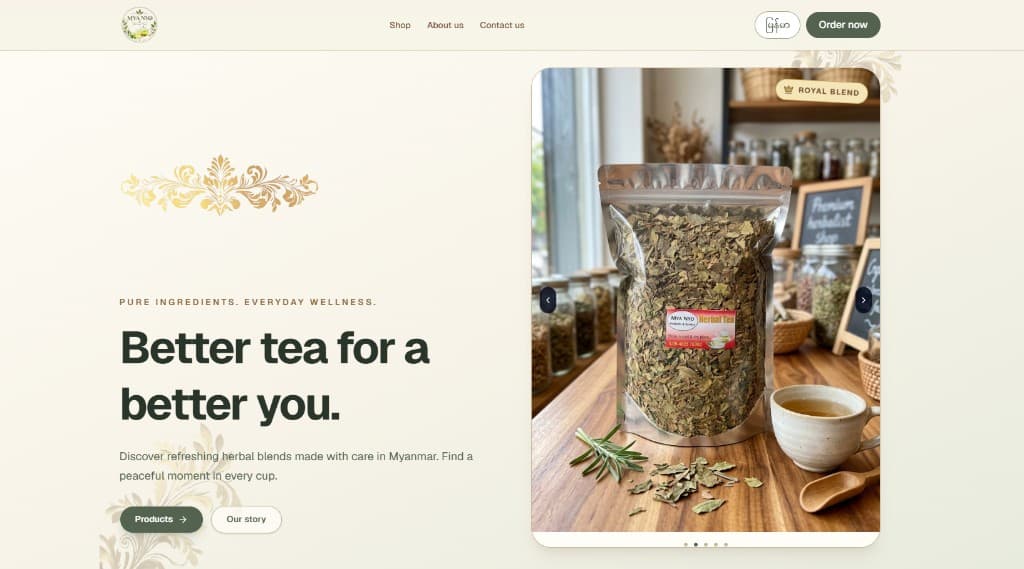 Visit the shop
The job
Mya Nyo sells herbal teas made in Myanmar. They needed a site that opens in Burmese, looks right on a phone, and lets a customer order by phone or Viber. The shop also needed to change products, photos, prices, and the About text without calling a developer.
The shop
The site opens in Burmese, with an English switch on the same pages. The top bar jumps straight to the teas. A product page has photos, stock, and the details in whichever language the customer is reading. Ordering is a phone button and a Viber button. There's no checkout to learn.
How it's built
The customer site and the admin dashboard are a React application built with Vite. An Express API stores products, shop settings, About copy, and admin accounts in MySQL. Sign-in uses a JWT kept in an HTTP-only cookie. Uploaded photos are processed with Sharp and kept with the rest of the shop data.
The admin
Products can be created, edited, hidden, restored, or deleted, and each one can carry several images. Names, descriptions, flavors, sizes, prices, categories, and stock are edited in Burmese and English. An admin can change their password and manage other accounts, but can't delete the one they're signed in with.
Now
The shop is live. Customers can browse categories, open a tea, and contact the shop by phone or Viber. The team can update the catalog, the contact details, and the About page from the dashboard.
Customer experience
- Burmese-first interface with an English language switch
- Layouts for mobile, tablet, and desktop
- Product categories and paginated product cards
- Product pages with image galleries, thumbnails, and navigation
- Stock indicators and localized product content
- A top bar that opens the full tea list
- Decorations for the products, About, and Contact sections
- Ordering and contact sections that fit a phone
- Phone and Viber ordering actions
Admin dashboard
- Cookie-based admin sign-in
- Burmese and English admin interface
- Create, edit, hide, restore, and delete products
- Upload multiple product images
- Edit names, descriptions, flavors, sizes, prices, categories, and stock
- Search and filter products by status
- Edit phone and Viber shop settings
- Edit the English and Myanmar About descriptions
- Add and delete other admin accounts
- Change the signed-in administrator's password
- Block deletion of the account that is currently signed in